
Strings: Understanding String Data
Learn how strings work in C, including character storage, null termination, indexing, traversal, and common string functions with simple examples.

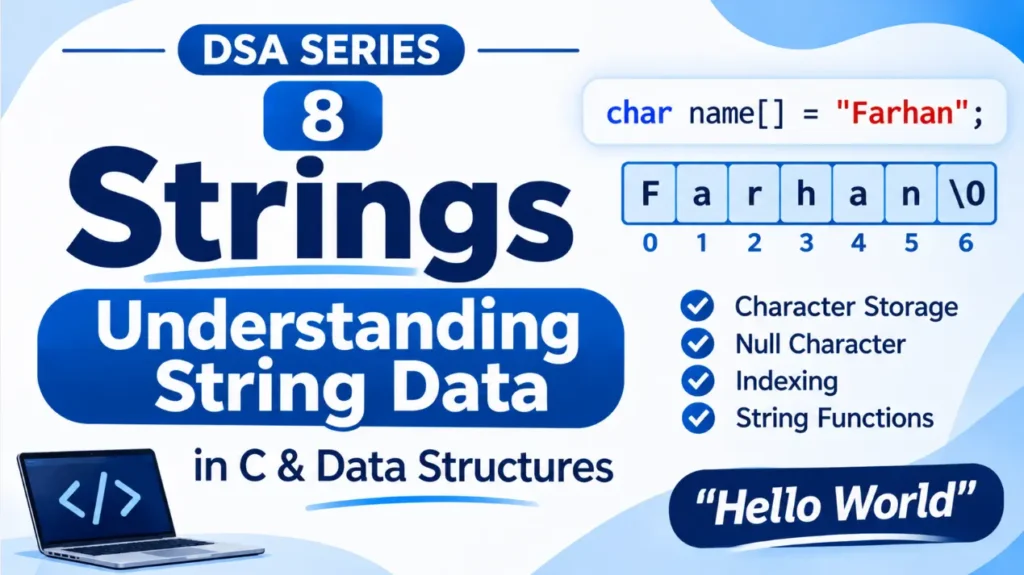
We have learned how arrays store multiple values of the same data type. But how do we store words, names, and sentences in a program?
For this, we use strings.
1. What Is a String?
A string is a sequence of characters used to represent text, such as a name, a word, or a sentence.
For example:
"Farhan"
"Hello World"
"Data Structures"
In C, strings are stored using character arrays.
Consider:
char name[] = "Farhan";Here, name is a character array containing the letters of the name.
Unlike an ordinary array of integers, a string stores characters.
2. How Are Strings Stored in C?
In C, every string ends with a special character called the <span class=”tooltip-term” data-tooltip=”The null character (\0) marks the end of a C string. It is added automatically when a string is initialised using a string literal.”>null character</span> (\0).
For example:
char name[] = "Cat";Although the word contains three letters, the array needs four positions because of the null character.
Its memory representation looks like this:
Index:      0      1      2      3
          +------+------+------+------+
          |  C   |  a   |  t   | \0   |
          +------+------+------+------+
The null character tells the program where the string ends.
This is an important difference between a C string and an ordinary character array: a character array is not necessarily a string unless it contains a terminating null character.
3. Accessing Characters in a String
Just like arrays, we can access individual characters in a string using indexes.
char name[] = "Farhan";

printf("%c", name[0]);
printf("%c", name[1]);
Output:
F
a
Remember, indexing starts from 0.
Therefore:
name[0]givesF.name[1]givesa.name[2]givesr.
We can also change an individual character:
name[0] = 'K';The string now becomes Karhan.
4. Traversing a String
We can visit each character of a string using a loop.
For example:
char name[] = "Farhan";

for (int i = 0; name[i] != '\0'; i++) {
    printf("%c\n", name[i]);
}
Output:
F
a
r
h
a
n
Notice that the loop continues until it reaches \0.
This is how we can process a string without knowing its length beforehand.
5. Common String Operations
C provides several built-in functions for working with strings. These functions are available through the string.h header file.
#include <string.h>Let’s look at some commonly used functions.
A. strlen() — Finding String Length
The strlen() function returns the number of characters in a string, excluding the null character.
char name[] = "Farhan";

printf("%zu", strlen(name));
Output:
6B. strcpy() — Copying a String
The strcpy() function copies one string into another character array.
char first[] = "Farhan";
char second[20];

strcpy(second, first);

printf("%s", second);
Output:
FarhanC. strcat() — Joining Strings
The strcat() function adds one string to the end of another.
char first[20] = "Hello ";
char second[] = "World";

strcat(first, second);

printf("%s", first);
Output:
Hello WorldThe destination array must have enough space for the combined string and its null character.
D. strcmp() — Comparing Strings
The strcmp() function compares two strings.
char first[] = "Apple";
char second[] = "Apple";

printf("%d", strcmp(first, second));
Output:
0A return value of:
0means both strings are equal.- A negative value means the first string is lexicographically smaller .
- A positive value means the first string is lexicographically greater.
The comparison is based on character values, not simply the lengths of the strings.
6. Where Are Strings Used?
Strings are used in almost every type of application.
Some common examples include:
- Storing names and addresses.
- Handling user input and passwords.
- Searching for words in documents.
- Sending and receiving messages.
- Processing text in search engines.
Whenever a program needs to work with text, strings play an important role.
Strings allow us to store and process text in programming. In C, they are represented using character arrays and are terminated by a null character (\0).
We can access individual characters using indexes and perform operations such as finding length, copying, joining, and comparing strings.
In the next article, we’ll explore Linked Lists: How They Work (Types and Operations).
Originally published at farhanpaal.com — https://farhanpaal.com/articles/strings-understanding-string-data/
Keep a copy
Print this article or save it as a PDF to read offline.
farhanpaal.comKeep reading
Space and Time Complexity in DSA
Understand time complexity, space complexity, Big O notation, and how to analyse algorithm efficiency with simple examples.
Linked Lists: How They Work (Types and Operations)
Learn how linked lists work, how nodes connect through pointers, and how to perform traversal, insertion, deletion, and searching.
Arrays: Understanding the Basics
Learn the basics of arrays, including indexing, memory representation, accessing, updating, traversing, insertion, and deletion with simple C examples.