
Linear Search vs. Binary Search
Learn how Linear Search and Binary Search work, compare their efficiency, and understand when to use each method with simple examples and C programs.

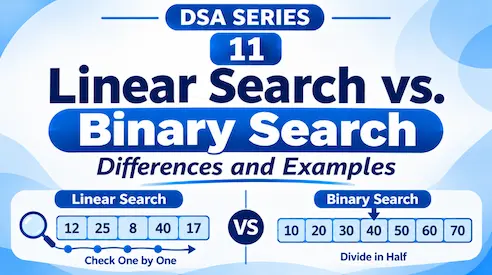
Imagine you have a list of student roll numbers and need to find a particular student.
How would you search for that number?
You could check every element one by one, or use a method that repeatedly divides the search area in half.
These approaches are called Linear Search and Binary Search.
1. What Is Linear Search?
Linear Search is a searching technique in which we check each element one by one until we find the required value or reach the end of the list.
Consider this array:
int numbers[] = {12, 25, 8, 40, 17};Suppose we want to find 40.
We check the elements in order:
12 → 25 → 8 → 40 → 17
 ✓   ✓   ✓    ✓

             Found!
We find 40 after checking four elements.
C Implementation:
#include <stdio.h>

int main() {
    int numbers[] = {12, 25, 8, 40, 17};
    int target = 40;
    int n = 5;

    for (int i = 0; i < n; i++) {
        if (numbers[i] == target) {
            printf("Element found at index %d", i);
            return 0;
        }
    }

    printf("Element not found");
    return 0;
}
Output:
Element found at index 3The loop checks each element until the target is found.
Important: Linear Search works on both sorted and unsorted arrays.
2. What Is Binary Search?
Binary Search is a searching technique that repeatedly divides a sorted array into two halves to find the required element.
Unlike Linear Search, Binary Search requires the elements to be sorted.
Consider this sorted array:
int numbers[] = {10, 20, 30, 40, 50, 60, 70};Suppose we want to find 60.
Let’s follow the steps.
Step 1: Find the middle element.
10   20   30   40   50   60   70
                ↑
             Middle
The middle element is 40.
Since 60 is greater than 40, we ignore the left half and search the right half.
Step 2: Find the middle element of the remaining portion.
                  50   60   70
                        ↑
                      Middle
The middle element is 60.
We have found our target!
Instead of checking all seven elements, Binary Search found the value in just two comparisons.
3. How Does Binary Search Work?
Binary Search uses three important variables:
low: The starting index of the current search area.high: The ending index of the current search area.mid: The middle index of the current search area.
We calculate the middle index using:
mid = low + (high - low) / 2;Then we compare the middle element with the target:
- If both are equal, the element is found.
- If the target is smaller, search the left half.
- If the target is greater, search the right half.
We repeat this process until the element is found or no search area remains.
C Implementation:
#include <stdio.h>

int main() {
    int numbers[] = {10, 20, 30, 40, 50, 60, 70};
    int target = 60;

    int low = 0;
    int high = 6;

    while (low <= high) {
        int mid = low + (high - low) / 2;

        if (numbers[mid] == target) {
            printf("Element found at index %d", mid);
            return 0;
        }
        else if (numbers[mid] < target) {
            low = mid + 1;
        }
        else {
            high = mid - 1;
        }
    }

    printf("Element not found");
    return 0;
}
Output:
Element found at index 54. Linear Search vs. Binary Search
Both algorithms help us find elements, but they work differently.
| Feature | Linear Search | Binary Search |
|---|---|---|
| Searching method | Checks elements one by one | Divides the search area in half |
| Data requirement | Sorted or unsorted | Must be sorted |
| Best-case time | O(1) | O(1) |
| Worst-case time | O(n) | O(log n) |
| Implementation | Simple | Slightly more complex |
| Suitable for | Small or unsorted lists | Large, sorted lists |
5. When Should We Use Each?
Use Linear Search when:
- The data is unsorted.
- The list is small.
- You want a simple searching method.
Use Binary Search when:
- The data is already sorted.
- The list is large.
- You need to find elements efficiently.
Remember, Binary Search is not automatically better in every situation. If the data is unsorted, sorting it first also takes time and may not be worthwhile if you only need to search once.
Linear Search checks elements one by one, while Binary Search repeatedly divides a sorted search area into two halves.
Linear Search is simple and works on any array, whereas Binary Search is much faster for large, sorted arrays.
In the next article, we’ll explore Bubble Sort, Selection Sort, and Insertion Sort.
Originally published at farhanpaal.com — https://farhanpaal.com/articles/linear-search-vs-binary-search/
Keep a copy
Read offline as a printout or PDF.
farhanpaal.comKeep reading
Binary Trees: Representation, Traversals, and Applications
Learn binary tree types, array and linked representations, and inorder, preorder, postorder, and level order traversals with diagrams and C examples.
B-Trees and B+ Trees: A Complete Guide
Learn B-Trees and B+ Trees, their structure, searching, insertion, deletion, and how they are used in databases and indexing.

Strings: Understanding String Data
Learn how strings work in C, including character storage, null termination, indexing, traversal, and common string functions with simple examples.